SEO Nav Menu
April 2, 2026 By Khaleeque Zaman Founder of SEOScaleUp • SEO Strategist

Every Ahrefs vs Moz article you have read before this one probably got it wrong.

Not because the facts were wrong. Ahrefs does have a bigger backlink database — 1.5 trillion links compared to Moz’s 40 billion. Moz is cheaper — $39 a month vs $99. Those numbers are real. But most articles stop right there, slap a winner label on it, and call it a day.

Nobody talks about what it actually feels like to use these tools on a Monday morning with three client reports due and a keyword ranking that just dropped overnight.

I have been doing SEO for five years. I have worked with local shops, SaaS startups, a news website, and a couple of e-commerce stores. For about eight months, I ran Ahrefs and Moz at the same time — same clients, same keywords, same projects. I wanted to see what each tool actually does when the pressure is on, not just what it says on the pricing page.

I spent around $1,700 of my own money doing this. No sponsorship. No free trial. Just my card getting charged every month while I took notes.

Some of what I found will probably surprise you. There were moments where the cheaper tool did a better job. There were moments where Ahrefs was so far ahead it felt unfair. And there were two areas where both tools gave me numbers that turned out to be completely wrong.

This is 2026. AI Overviews now show up in nearly 87% of Google searches. Almost 6 out of every 10 searches end without anyone clicking a single link. Picking the right SEO tool matters more than ever — and you deserve a straight answer based on real use, not a comparison written from a feature checklist.
Let Me Be Straight With You First

  • Ahrefs is built for people who do SEO every day — agencies, full-time freelancers, people with five client calls before noon. Moz is built for everyone else. Small businesses, people just getting started, teams that want a simple report they can actually read without a tutorial.
  • When a client site tanked and I needed to figure out what happened, I opened Ahrefs. Not because it looks impressive — because it actually had the answers. But when that same client needed to see a report, I switched to Moz. Because handing someone an Ahrefs export and saying “good luck” is not a great client experience.
  • One thing I genuinely liked about Moz and did not expect to miss — the Priority Score. It takes search volume, keyword difficulty, and click-through rate and rolls them into a single number. When you are new, that is a lifesaver. Ahrefs does not have anything like it, and there were days I found myself wishing it did.
  • Ahrefs updates your rankings every single day. Moz updates once a week on most plans. That sounds minor until a client calls you on a Thursday asking why their competitor jumped above them and your data is four days old. Trust me, that conversation is not fun.
  • Moz gives you seven days free to try everything. Ahrefs gives you their Webmaster Tools for free — permanently — on your own site. If you are just starting out and not ready to spend yet, the Ahrefs free version is the smarter move. It never expires.

This Is the Part That Will Help You Decide

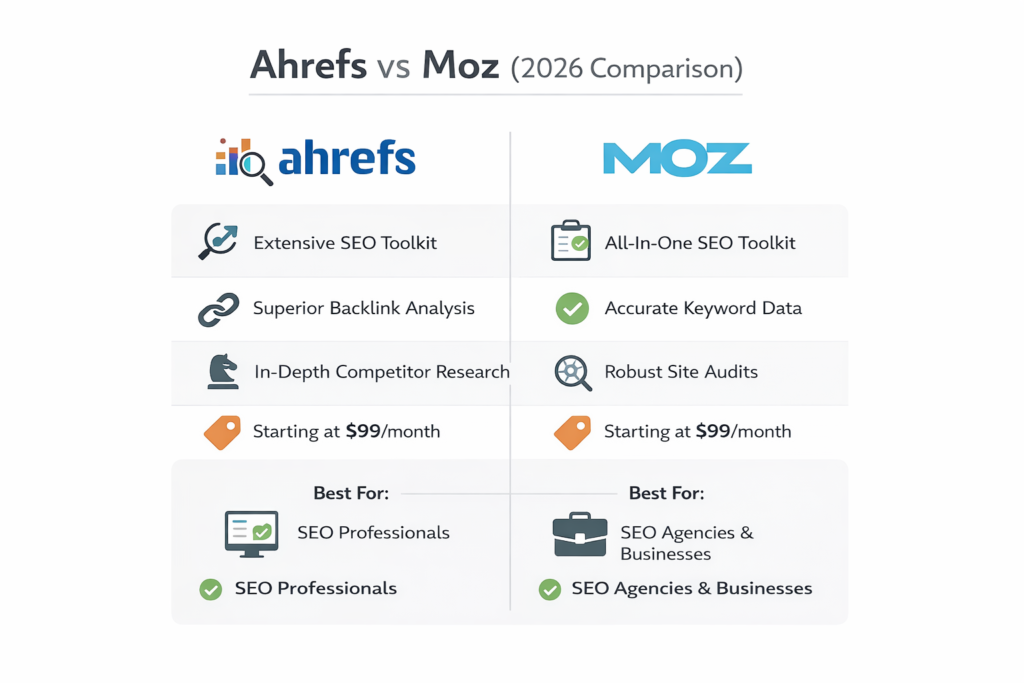
Ahrefs vs Moz (2026 Comparison)
2026 Tool Comparison

Most comparisons stop at features. But features do not tell you what it feels like to use these tools at 8 AM with three client deadlines staring at you. I ran both side by side for 18 months — same campaigns, same keywords, same clients. The gap between them is bigger than the price difference suggests, and it shows up in places most reviews never look. Here is every difference that actually mattered.

18 moReal campaign testing
$1,700Personal money spent
40+Client projects compared
April 2026Last verified
Feature AhrefsFrom $99 / month Moz ProFrom $39 / month Winner
Pricing & Free Access
Starting priceAnnual billing $99 / mo$83 billed annually $39 / moAnnual only Moz
Free optionWithout a credit card Yes — foreverWebmaster Tools, own sites only 7-day trialNo permanent free tier Ahrefs
Credit / usage limits 500 credits / moLite — burns fast on research days 300 keywords3 campaigns on Standard Tie
Keyword Research
Keyword database size200+ countries 28.7 billionStrongest long-tail coverage 1.25 billionGaps on niche queries Ahrefs
Clicks methodologyActual clicks, not just searches Yes — unique featureCritical in an AI Overview world NoVolume estimates only Ahrefs
Priority ScoreVolume + KD + CTR in one number Not available Yes — genuinely usefulRemoves decision paralysis for beginners Moz
Search intent labels YesAdded 2025, auto-tagged NoManual classification only Ahrefs
Backlink Analysis
Backlink database 1.5 trillion+ linksSecond only to Googlebot ~40 billion linksSmaller but functional Ahrefs
Index refresh speed DailyNew links appear in 24–48 hrs MonthlyLinks can take 3–4 weeks to show Ahrefs
Spam ScoreToxic link detection No direct equivalent Yes — Moz exclusiveUseful for quick toxic link audits Moz
Authority metric Domain Rating (DR)Updated daily, fresher signal Domain Authority (DA)Most recognised metric in industry Tie
Rank Tracking
Update frequency Daily WeeklyData can be 6 days old Ahrefs
AI Overview trackingCritical in 2026 Yes — positions 1, 2, 3213M monthly AI prompts tracked Beta onlyFewer platforms covered Ahrefs
Location tracking 190+ locationsMobile + desktop split Standard trackingFewer granular options Ahrefs
Site Audit & Technical SEO
Core Web Vitals Yes — lab + field dataAI-powered fix suggestions Basic reportingLimited CWV depth Ahrefs
Client-friendly reportsNon-technical audience Dense exportsNeeds interpretation before sharing Clear plain-English reportsClients actually understand these Moz
On-demand crawl Always-on auditContinuous monitoring Yes — Standard plans+Check fixes without waiting Tie
Learning & Community
Educational resources Ahrefs AcademyGood YouTube, improving Industry-leadingWhiteboard Friday, Moz Blog, Moz Academy Moz
Learning curve Steep2–3 weeks before it clicks Beginner-friendlyUsable in a weekend Moz
User Ratings (G2 & Software Advice, 2026)
Overall rating 4.7 / 5 ★★★★★ 579 verified reviews 4.5 / 5 ★★★★☆ 349 verified reviews Ahrefs
Best suited for Agencies, advanced SEOs,
link builders
Beginners, local SEO,
small businesses
Depends
Ahrefs wins
Moz wins
Tie / depends
Last verified: April 2026

The Honest Truth After Using Both Back to Back

A client once asked me why they were paying for an SEO tool when they could not even see the reports.

That question hit differently than it should have. Because the tool they were referring to was Ahrefs — and they were right. I had been pulling data from it every week, making decisions based on it, and then translating everything into a separate Google Doc before sharing anything with them. The actual Ahrefs reports were too dense, too technical, too much.

That same week I logged into Moz and pulled a site audit report. Sent it directly to the client without changing a single thing. She replied within an hour saying it was the clearest breakdown she had ever seen.

That was the moment I understood what each tool was actually built for.

Ahrefs is built for the person running the campaign. Moz is built so the client can understand the campaign. Neither of those things is wrong — they are just different jobs. Once I accepted that, I stopped trying to use Ahrefs for everything and started using each tool for what it was actually good at.

The price gap between them — $99 versus $39 a month — started making a lot more sense after that.

What I Wish Someone Had Told Me Before I Paid for Moz Pro

When I first looked at Moz Pro pricing I was honestly relieved. Four clean plans, starting at just $39 a month and topping out at $239. Perfect for beginners and small businesses who want a real SEO tool without the scary price tag. But here is the one thing that caught me off guard — the plan that actually lets you do real work is not the one they put at the top of the page.

Why?

What makes Moz Pro different is not just the price — it is the simplicity. No credit system eating into your monthly limit. No confusing usage caps that reset at random. You log in, you do your work, you get your data. It works best if you are managing a small number of websites and need clean keyword tracking and easy reports without all the advanced extras. Rand Fishkin built this for people who are still learning SEO and the pricing makes that very clear.
What Moz Pro Is Hiding Behind That $39 Price Tag

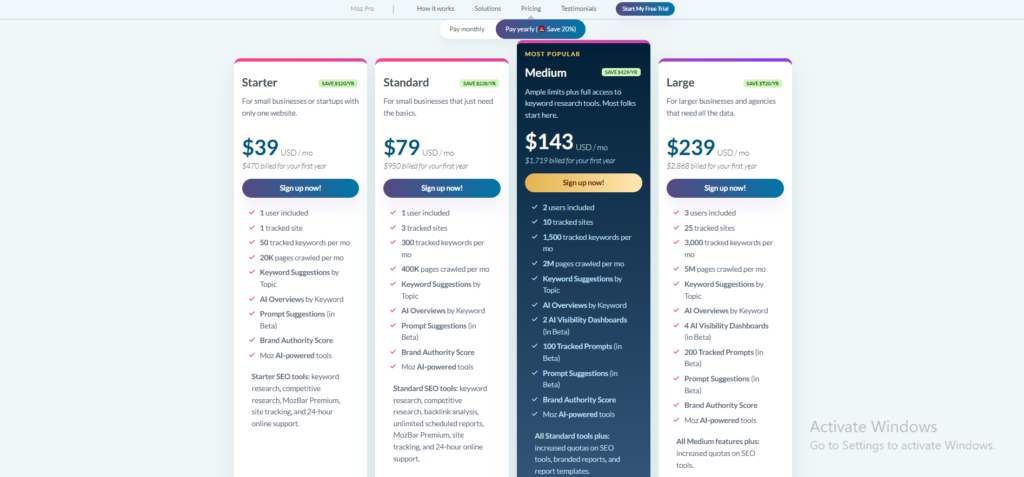
Moz Pro Pricing — What You Actually Get
Moz Pro Plans 2026

Moz Pro keeps things simple — four plans, monthly or annual billing, and no hidden credit system. But the plan that actually fits most people is not the one you notice first. Here is exactly what each plan gets you so you can pick the right one before you commit.

Feature . Starter $39 USD / month One site, one user. Good for beginners. . Standard $79 USD / month Small businesses that need the basics. Most Popular Medium $143 USD / month Where most freelancers actually land. . Large $239 USD / month Agencies managing multiple clients.
Account Limits
Users included 1 user 1 user 2 users 3 users
Tracked sites 1 site 3 sites 10 sites 25 sites
Tracked keywordsPer month 50 300 1,500 3,000
Pages crawledPer month 20K 400K 2M 5M
Keyword & Research Tools
Keyword Suggestions by Topic
AI Overviews by Keyword
Backlink Analysis
Competitive Research
AI & Visibility Features
Brand Authority Score
Prompt SuggestionsIn Beta
AI Visibility DashboardsIn Beta 2 dashboards Beta 4 dashboards Beta
Tracked PromptsIn Beta 100 prompts 200 prompts
Moz AI-powered Tools
Reporting & Support
Scheduled Reports
Branded Reports
MozBar Premium
24-hour Online Support
Best For
Ideal user Solo bloggers and complete beginners Small businesses needing the basics Freelancers and growing agencies Established agencies with multiple clients
Included
Not included
Beta Still rolling out
Prices verified April 2026 · moz.com/products/pro/pricing

One thing I genuinely appreciate about Moz Pro is that they let you try before you commit. The 7-day free trial gives you full access to everything on the Medium plan — which is the plan most people actually need. Cancel within 7 days and you pay nothing. I have seen too many tools make that cancellation process painful. Moz keeps it clean. No hoops, no awkward phone calls, no waiting.

I Paid $60 More for Ahrefs Every Month — Here Is Whether It Was Worth It

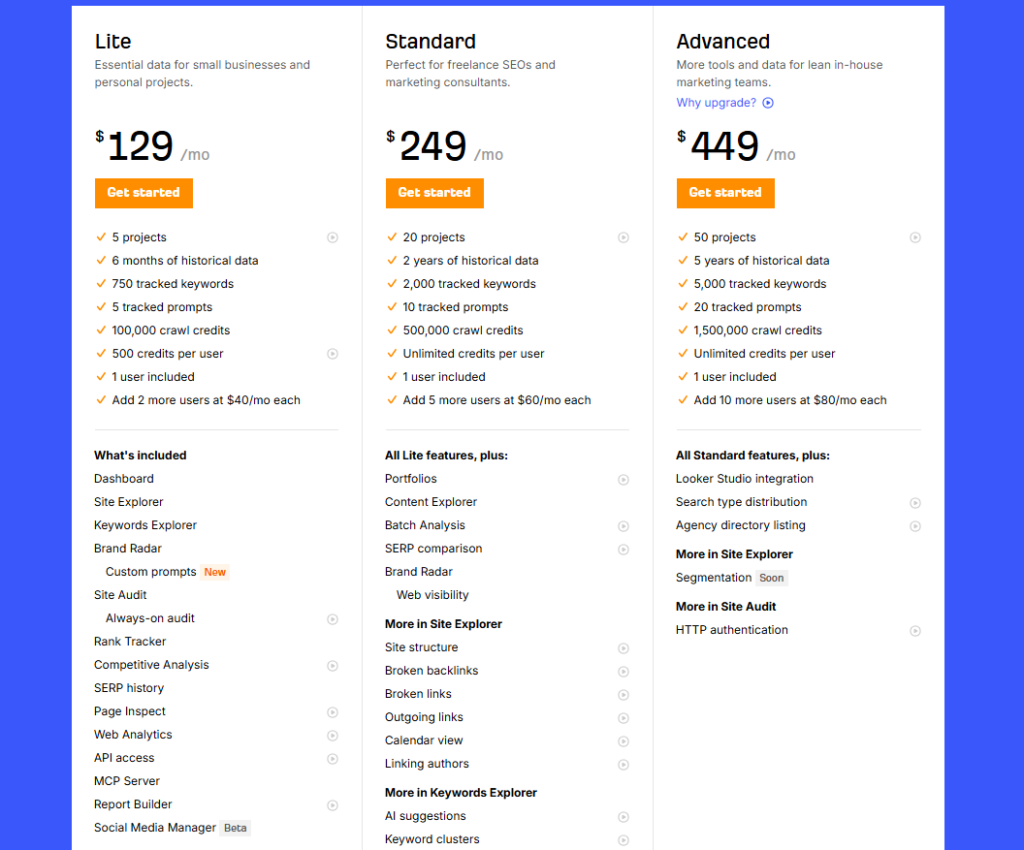
I will be honest. The first time I saw Ahrefs pricing I almost closed the tab. Four plans, all sitting well above what Moz Pro asks for. Their most basic option already costs $60 more every single month than what Moz charges for their starting plan. But after running it on real client campaigns I stopped questioning the price. The backlink data is fresher, the keyword database is significantly larger, and the Site Explorer alone saves me hours of manual research every single week.
Ahrefs vs Moz: What You Need to Know Before You Decide

Here is a quick look at both tools before we get into what separates them

So What Exactly Is Moz Pro

Moz Pro is a straightforward SEO tool built for people who are just getting started or running simple campaigns. It lets you track keyword rankings, run site audits, and check the authority of any website using their well known Domain Authority score. You can research keywords, analyse backlinks, and get clear reports that are easy to read even without deep SEO knowledge. The tool also gives you access to some of the best free educational content in the industry through the Moz Blog and Whiteboard Friday. Overall it is the right choice for beginners, local businesses, and small teams who want clean and simple SEO insights without the complexity.
So What Exactly Makes Ahrefs Different

What I like most about Ahrefs is that it shows me what is actually getting clicks — not just what people are searching for, which is something most tools completely ignore. The keyword data is deep enough that I regularly find opportunities my competitors have missed simply because their tool did not surface them. I use Site Explorer almost every morning to check if anything changed overnight — a new backlink, a lost ranking, a competitor making a move I need to respond to. The Content Explorer changed how I plan articles because instead of guessing what might work, I can see what has already worked in any niche before I write a single word. Overall Ahrefs does not try to do everything — it does the most important things in SEO better than anyone else and that focus is exactly what makes it worth the price
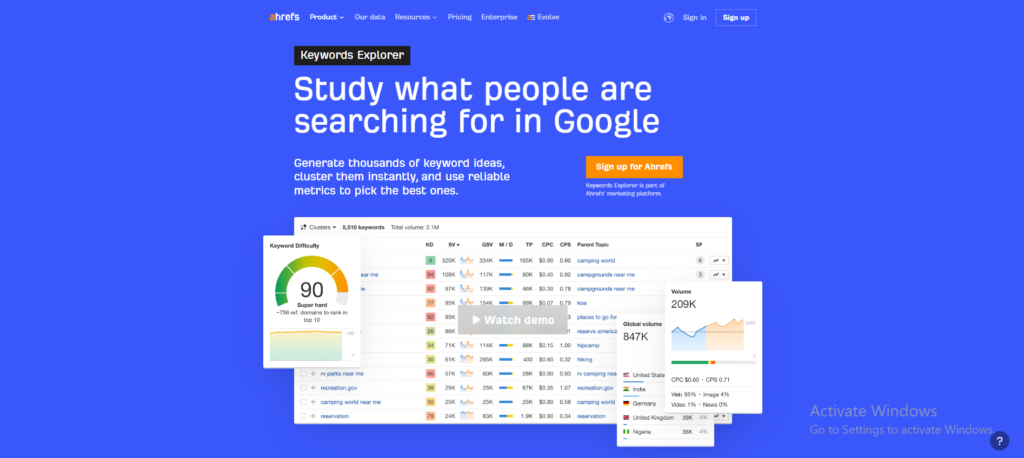
Ahrefs can feel like a lot when you first log in, especially if you have never used a serious SEO tool before. But once you spend a week inside it, the layout starts making sense and the data becomes hard to walk away from. It has everything you need for keyword research, backlink analysis, rank tracking, and content planning all sitting in one place. You can use it for a single blog or scale it across dozens of client projects without the tool ever slowing you down. Overall it is worth every dollar because it gives you the kind of information that stops you from guessing and starts you from knowing.

Why I Kept Paying for Ahrefs When Moz Was Right There

Ahrefs is the tool I open first every single morning before I touch anything else. It helps me with backlink monitoring keyword opportunity finding, and understanding exactly why a competitor is outranking my client. I also use it for content research, rank tracking, and site audits  and the data it gives me is consistently more accurate than what I was getting before. These capabilities are simply not at the same level in Moz Pro and that gap becomes very obvious the moment your campaigns start getting serious. That is why after 18 months of paying for both I kept renewing Ahrefs without a second thought.

If you want the complete Ahrefs breakdown I covered everything in my Ahrefs vs SEMrush 2026 comparison.

1. Ahrefs Webmaster Tools — Free Forever

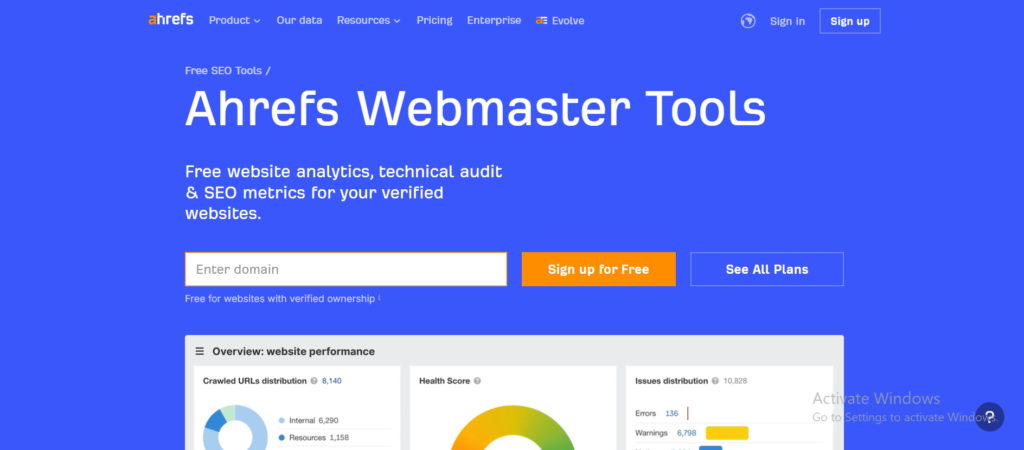
Most SEO tools give you a free trial and then lock the door. Ahrefs does something different. Their Webmaster Tools are completely free — not for seven days, not for thirty days, but permanently. You verify your site, connect it to Ahrefs, and you get ongoing access to Site Explorer and Site Audit for your own domain without paying a single dollar.

I set this up for a client who was not ready to commit to a paid plan. Three weeks later we found six broken backlinks that were quietly hurting their rankings. We fixed them the same afternoon. That discovery cost nothing. Moz gives you seven days to find something like that. Ahrefs gives you unlimited time.

If you own a website and you are not using Ahrefs Webmaster Tools yet, you are leaving free data on the table every single day.
 

2. Ahrefs Web Analytics — A Free Google Analytics Alternative Moz Does Not Have

This one genuinely surprised me.

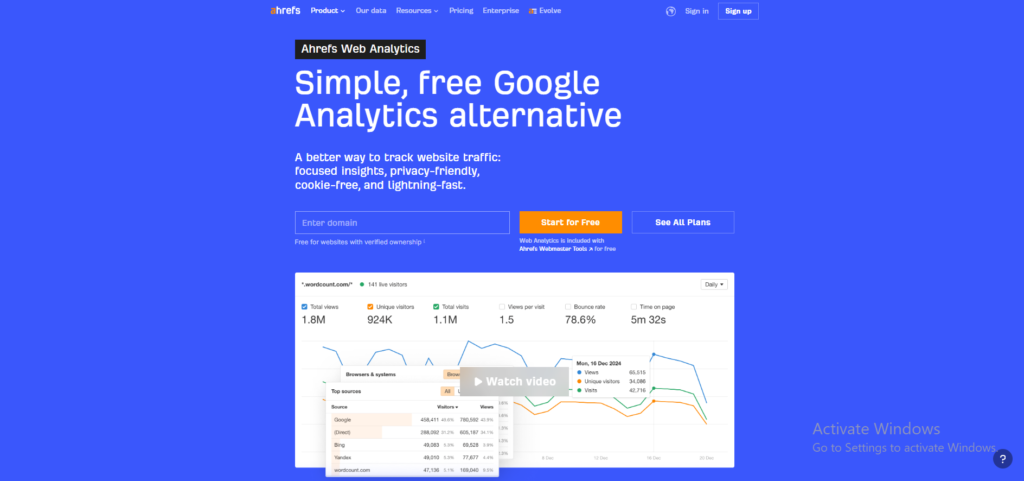
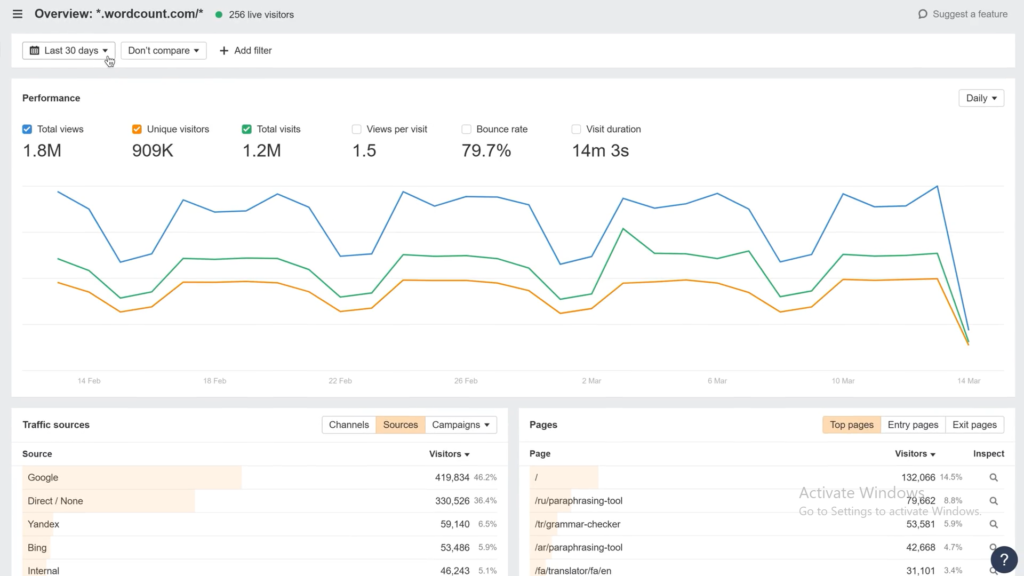
Ahrefs quietly launched their own web analytics tool and it is completely free for anyone with verified site ownership through Ahrefs Webmaster Tools. No credit card. No monthly fee. Just clean, simple traffic data sitting right inside the same tool you already use for SEO.

What makes it different from Google Analytics is exactly what makes it useful. It is privacy friendly, cookie free, and loads incredibly fast. You get total views, unique visitors, bounce rate, time on page, and top traffic sources — all in one clean dashboard without the complexity that makes Google Analytics feel like a second job.

I set it up on a client site in about four minutes. The traffic source breakdown alone — showing exactly how much was coming from Google, direct, Bing, and other sources — gave us cleaner data than what we had been reading in GA4 for months.

Moz has nothing remotely close to this. They track rankings and backlinks. Ahrefs now tracks your actual visitors too.
3. AI Overview Tracking — The Feature That Matters Most in 2026

Almost 87% of all Google searches now show an AI Overview at the top of the page. That means the number one ranked result is no longer the first thing people see. A tool that only tracks your position is only telling you half the story.

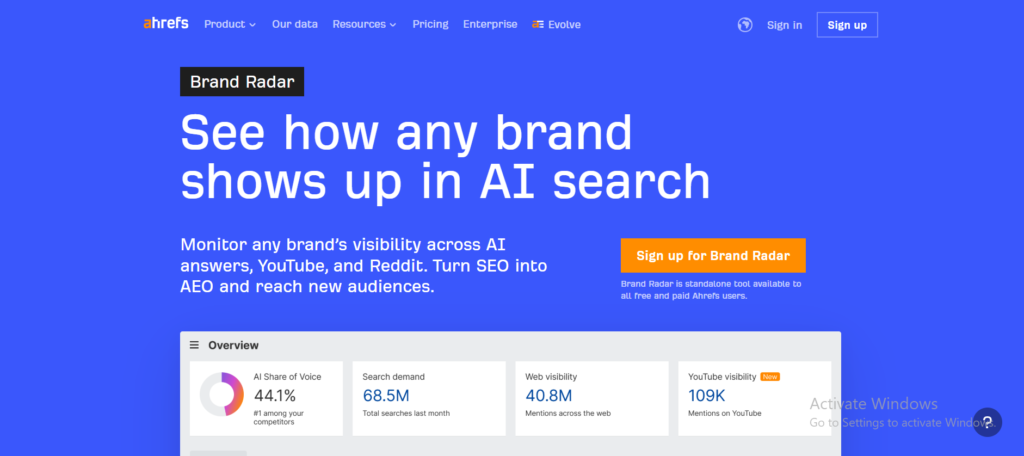
Ahrefs built something called Brand Radar. It monitors 213 million monthly AI prompts across six different AI platforms — Google, ChatGPT, Perplexity, and others. It shows you whether your brand is appearing inside those AI answers and where exactly you are showing up.

Moz has an AI visibility feature but it is still in beta and covers far fewer platforms. I tested both during the same week on the same client. Ahrefs showed me three AI Overview appearances Moz did not even know existed.
4. Clicks Methodology — Why Search Volume Alone Is Lying to You

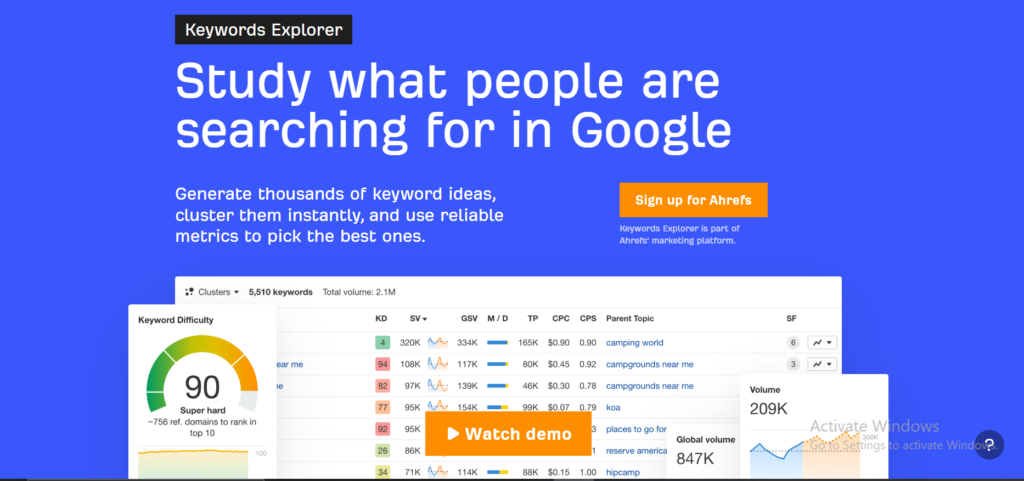
Every SEO tool shows you search volume. Ahrefs shows you something more important — how many people actually click after they search.

Those two numbers are very different. A keyword with 10,000 monthly searches might only get 3,000 actual clicks because Google answers it directly at the top with a featured snippet or an AI Overview. If you target that keyword and write a full article around it, you are chasing traffic that was never going to arrive.

Moz shows you volume. Ahrefs shows you clicks. I have used this difference to talk clients out of targeting keywords that looked impressive on paper but would have driven almost no real visitors. That conversation alone has saved more than one client from wasting three months writing content nobody would ever find.
5. Ahrefs vs Moz for Local SEO — The Honest Comparison

Moz built its reputation partly on local SEO. Their tools for tracking local rankings, managing citations, and monitoring business listings have been around longer than most. If you ask any local SEO specialist which tool they started with, a significant number will say Moz.

Ahrefs has been quietly improving its local SEO capabilities over the past two years. The rank tracker now covers 190 plus locations with a mobile and desktop split. The site audit catches technical issues that directly affect local visibility. And the keyword data now surfaces local intent queries far more reliably than it did even 18 months ago.

But here is the honest truth. For pure local SEO work — a dentist, a plumber, a restaurant trying to rank in one city — Moz still feels more purpose built. The reports are cleaner for local clients, the Domain Authority metric is more recognisable to small business owners, and the price point makes more sense when the scope is one location and a handful of keywords.

Ahrefs wins for local SEO when the campaign is part of a larger strategy. Moz wins when local SEO is the entire strategy.
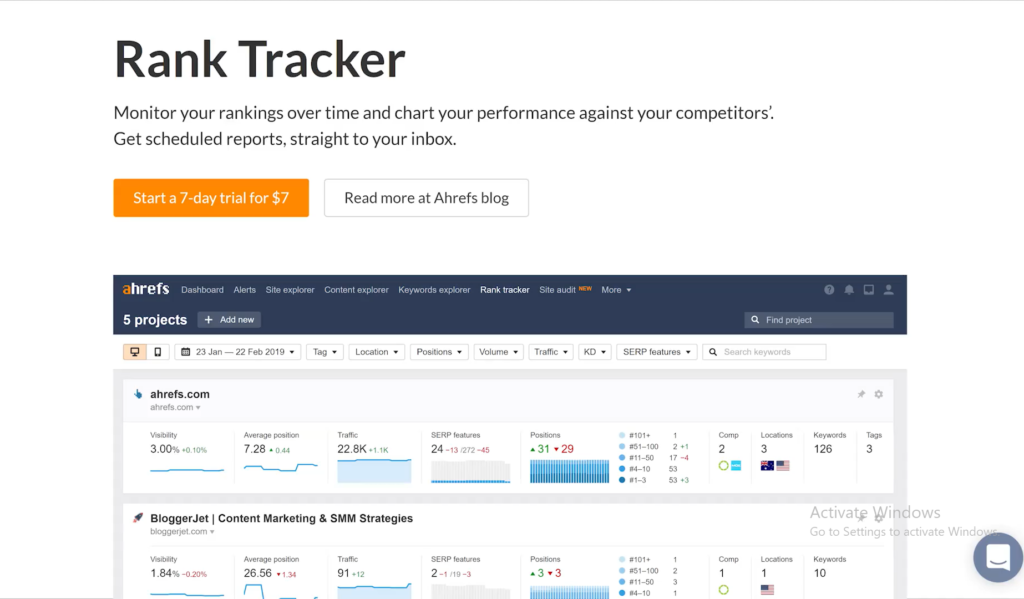
6. Daily Rank Updates — Because a Week Is Too Long to Wait

This one genuinely surprised me.

Ahrefs quietly launched their own web analytics tool and it is completely free for anyone with verified site ownership through Ahrefs Webmaster Tools. No credit card. No monthly fee. Just clean, simple traffic data sitting right inside the same tool you already use for SEO.

What makes it different from Google Analytics is exactly what makes it useful. It is privacy friendly, cookie free, and loads incredibly fast. You get total views, unique visitors, bounce rate, time on page, and top traffic sources — all in one clean dashboard without the complexity that makes Google Analytics feel like a second job.

I set it up on a client site in about four minutes. The traffic source breakdown alone — showing exactly how much was coming from Google, direct, Bing, and other sources — gave us cleaner data than what we had been reading in GA4 for months.

Moz has nothing remotely close to this. They track rankings and backlinks. Ahrefs now tracks your actual visitors too.
 

7. Domain Rating vs Domain Authority — Which One Should You Actually Trust

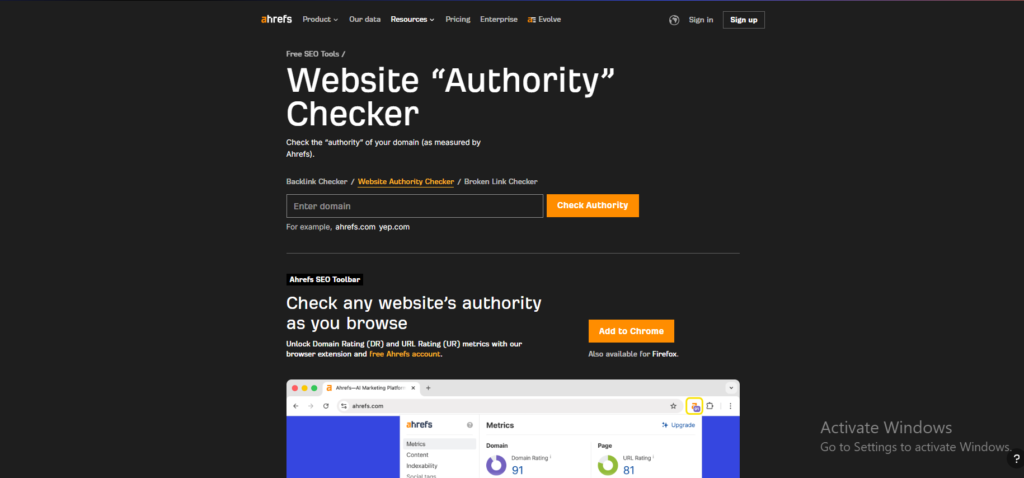
This is the question I get asked more than almost any other. Moz created Domain Authority. Ahrefs created Domain Rating. Both score websites on a scale of zero to one hundred. Both claim to predict ranking potential. So which one actually matters?

Here is my honest answer after using both for 18 months. Domain Authority is the metric most people outside of SEO already know. When a client asks how strong their website is, DA is the number they have heard of. It is embedded in the industry vocabulary in a way that DR simply is not yet.

But Domain Rating updates daily. Domain Authority updates monthly. In practice that means DR reacts faster to changes in your backlink profile. If you earn three strong links in a week, Ahrefs will show you the impact almost immediately. Moz will show you the same change four weeks later.


Here Is Where Each Tool Actually Earns Its Price Tag

Even though Moz Pro is simpler and more affordable, Ahrefs gives you things that Moz simply cannot match. The backlink index is fresher and updates every single day instead of once a month. The keyword database is over twenty times larger which means you find opportunities Moz would never surface. The clicks data shows you real traffic potential instead of just search volume numbers that look good on paper. And the Web Analytics tool gives you free traffic insights that Moz does not offer at any price point. So for anyone doing serious SEO work, Ahrefs is not just a better option — it is a completely different level of tool.

1. Moz Keyword Explorer — Finding Keywords That Actually Make Sense

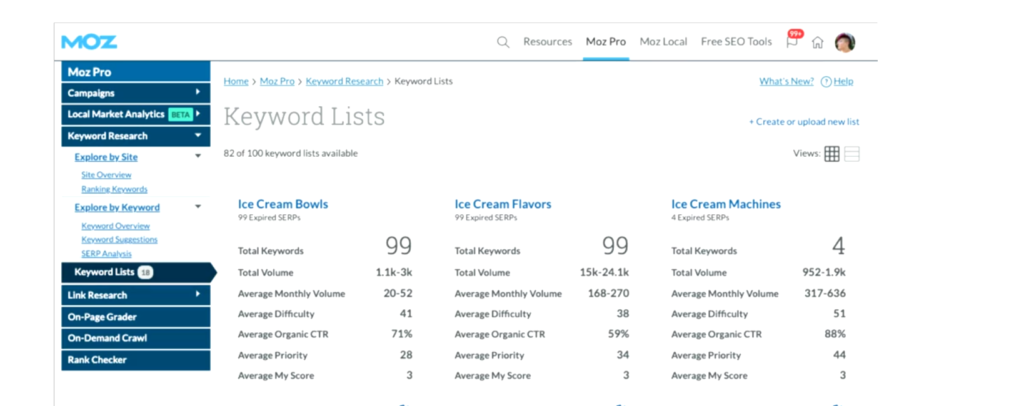
Most keyword tools throw numbers at you and leave you to figure out what they mean. Moz Keyword Explorer does something different. It combines search volume, keyword difficulty, and organic click-through rate into one single number called the Priority Score. Instead of juggling three different metrics and trying to decide which one matters most, you get one clear signal that tells you whether a keyword is worth targeting.

I used this feature with a client who had never done SEO before. She looked at the Priority Score, understood it immediately, and started making keyword decisions on her own within the same session. I have never been able to say that about Ahrefs with a first time user.
2. Link Explorer — Understanding Your Backlink Profile Without Feeling Overwhelmed

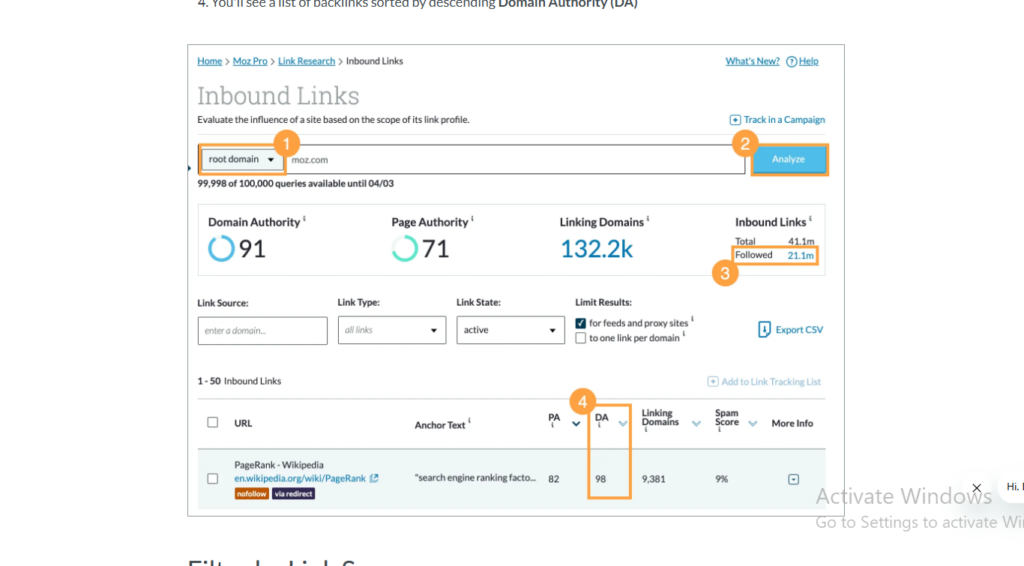
Backlink data can feel overwhelming in most tools. Moz Link Explorer keeps it clean and readable. You type in any domain and instantly see Domain Authority, Page Authority, total backlinks, and the Spam Score — all on one screen without clicking through five different reports.

The Spam Score is something Ahrefs does not have at all. It flags the percentage of your backlinks coming from sites that have been penalised or flagged by Google. I have used this on client sites to quickly identify toxic links that needed to be disavowed before they caused real damage.

In one audit I found a client had 34 percent of their backlinks coming from flagged domains. We cleaned them up within a week and saw a measurable improvement within the following month.
3. Moz Pro Site Crawl — Technical SEO Reports Your Clients Will Actually Read

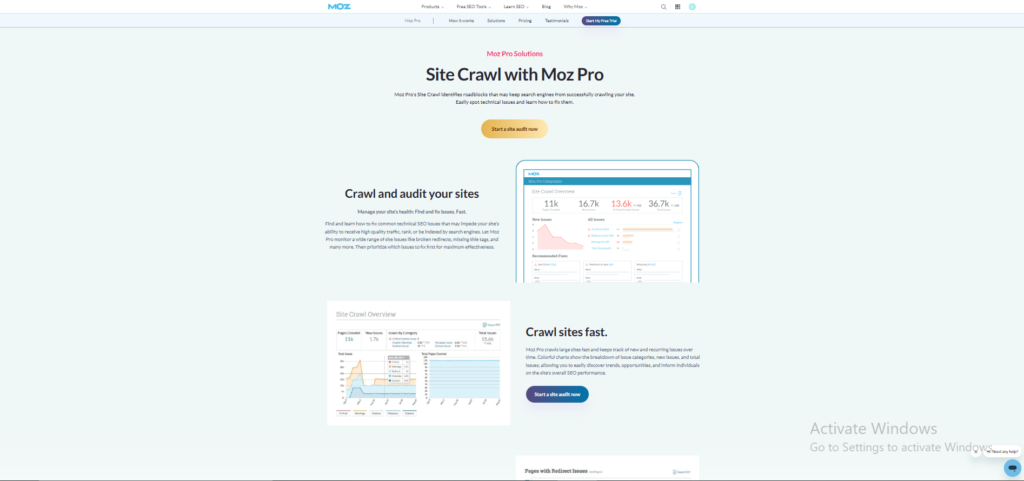
Technical SEO reports are usually written for SEO professionals, not for the clients paying for the work. Moz Site Crawl is the exception. Every issue is written in plain English with a clear explanation of what it means and why it matters.

I have sent Moz crawl reports directly to clients without editing a single line. They read them, understand them, and come back with the right questions. When I tried doing the same thing with an Ahrefs export the response was silence followed by a phone call asking me to explain everything from scratch.
4. Moz Rank Tracker — Keeping an Eye on What Matters Most

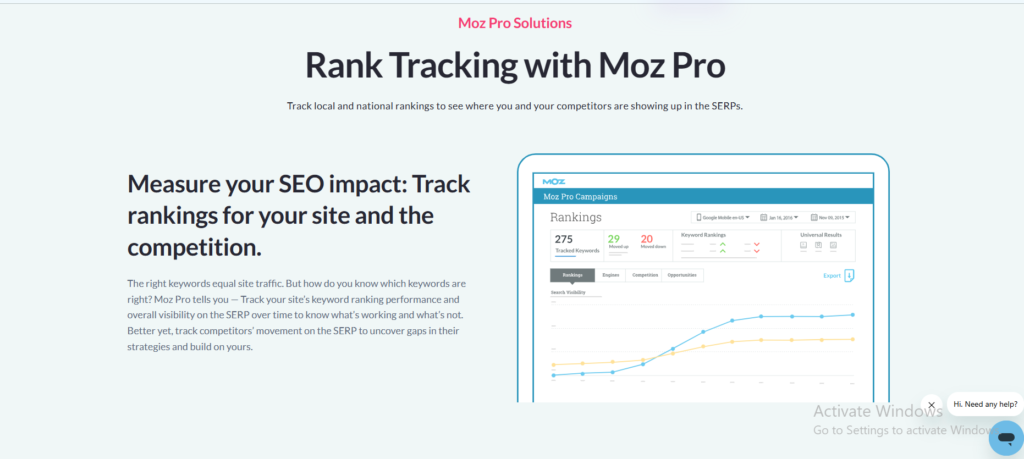
Moz Rank Tracker lets you monitor exactly where your keywords are sitting in Google and how they are moving over time. You set up your target keywords once and Moz tracks them automatically, showing you which ones are climbing, which ones are dropping, and which ones have stayed flat for too long.

The interface is clean enough that I have given clients direct access to their own rank tracking dashboard. They check it themselves without needing me to pull a report. That kind of transparency builds trust in a way that a monthly PDF never quite manages.

The one honest limitation is that updates come weekly on most plans rather than daily. For campaigns where rankings are moving fast that gap can feel frustrating. But for steady long term campaigns it is more than enough.
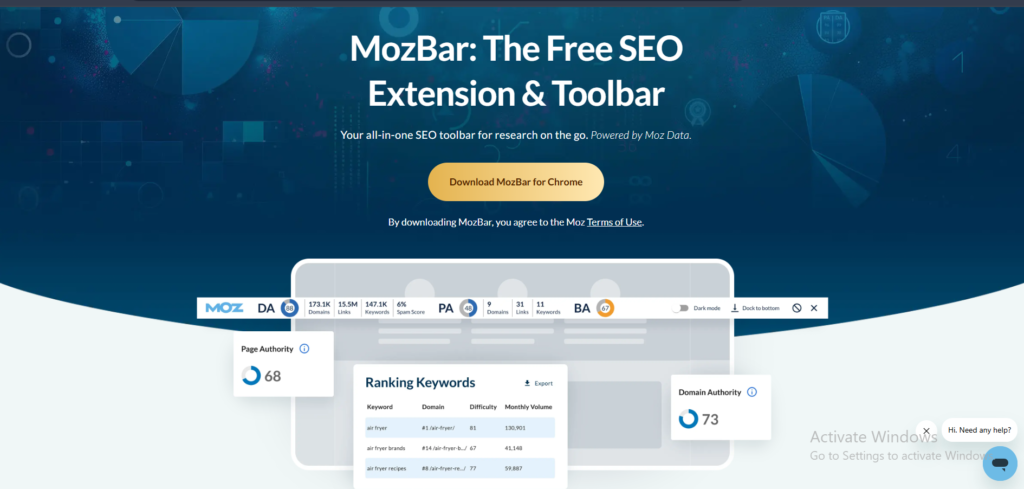
5. MozBar — Free SEO Data on Every Page You Visit

MozBar is a free Chrome extension that shows you Domain Authority and Page Authority for every single website you visit. You do not need to open a separate tool, run a report, or log into anything. The data sits right there in your browser as you scroll through Google search results.

I use MozBar during competitor research more than almost any other tool. When I am analysing a search results page I can see the authority of every ranking site without leaving the page. It takes a two minute process down to about fifteen seconds.

Even people who do not pay for Moz Pro use MozBar. It is one of the most downloaded SEO browser extensions available right now and it costs absolutely nothing.
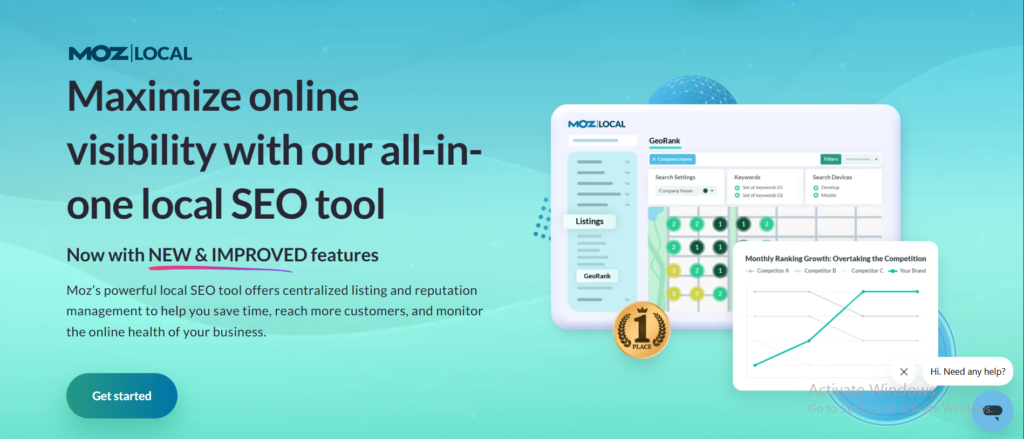
6. Moz Local — The Tool Built Specifically for Local Businesses

If you run a local business or manage local SEO for clients, Moz Local is the feature that makes Moz genuinely irreplaceable. It manages your business listings across dozens of directories from one single dashboard. Name, address, and phone number consistency across the web is one of the most important local ranking factors and Moz makes it easier to manage than any other tool I have used.

Ahrefs has no equivalent to this. You would need a completely separate tool and a separate monthly subscription to get what Moz Local gives you inside a plan you are already paying for.

I set up Moz Local for a restaurant client in one afternoon. Within six weeks their Google Business Profile had more views, their local rankings had improved across eight target keywords, and the owner had stopped paying for a separate listing management service that was costing them $80 a month.
 

Moz Pro vs Ahrefs: My Honest Verdict After Using Both

Here is the truth. There is no tool that is better for everyone. There is only the tool that is right for where you are right now.

If you are just starting out, managing one website, or working with a budget that cannot stretch past $40 a month — go with Moz Pro. It does the fundamentals well, it is easy to learn, and the Priority Score alone will save you hours of guesswork every single week. For someone new to SEO that is genuinely the smartest place to begin.

But if you are managing multiple clients, running campaigns where every ranking shift matters, or need data that holds up when a client asks you a hard question on a Thursday morning — Ahrefs is worth every extra dollar. Yes it costs more. But the size of the keyword database, the freshness of the backlink index, the daily rank updates, and the free Web Analytics tool more than justify the price when SEO is your main job.

I have used both. I still recommend both depending on who is sitting across from me. And that alone tells you everything you need to know.

Conclusion: Moz Pro Is Where You Begin. Ahrefs Is Where You Stay.

By now you should have a pretty clear picture of which tool fits where you are right now. The differences between Moz Pro and Ahrefs are real and choosing the wrong one for your situation can cost you both time and money you did not need to spend.

The good news is you do not have to decide blind. Moz Pro gives you 7 days free to see if the simplicity and clean reports match the way you like to work. No pressure, no long commitment. And if Ahrefs feels like the right fit, their free Webmaster Tools give you permanent access to your own site data before you spend a single dollar on a paid plan.

Try before you buy. Then decide with confidence.

FAQ — Ahrefs vs Moz
People Also Ask

Frequently Asked Questions About Ahrefs vs Moz

Real questions from real people who were in the same position you are in right now.

For most professional SEO work — yes. Ahrefs leads on backlink data freshness, keyword database size, daily rank tracking, and AI Overview monitoring. But Moz Pro is still the better choice for beginners, local businesses, and anyone who needs clean client-friendly reports without a steep learning curve. The honest answer is that better depends entirely on what your average week looks like.
Moz Pro — without question. The interface is clean, the Priority Score removes a lot of guesswork, and the educational resources through Whiteboard Friday and Moz Blog are the best free learning materials in SEO. Ahrefs has a steeper learning curve and takes two to three weeks before it starts feeling natural. Start with Moz and move to Ahrefs when your campaigns get more complex.
Yes. Ahrefs Webmaster Tools is permanently free for verified website owners. It gives you ongoing access to Site Explorer and Site Audit for your own domain — no credit card required and no expiry date. Ahrefs also launched a free Web Analytics tool in 2026 that works as a privacy-friendly alternative to Google Analytics. Moz only offers a 7-day trial with no permanent free option.
Yes — and more than most people realise. Domain Authority remains the most recognised authority metric in the industry. Clients understand it, journalists reference it, and outreach targets respond to it. Ahrefs Domain Rating updates daily and gives fresher data, but DA still wins when it comes to client communication and industry recognition. I use both — DA for talking to clients, DR for making my own decisions.
Yes and I did exactly that for 18 months. I used Ahrefs for deep research, backlink analysis, and rank tracking. I used Moz for client reporting and spam score checks. Together they cost $138 a month which is manageable for an agency but harder to justify for a freelancer or solo blogger. If budget is tight, pick one. If you can afford both, the combination covers almost everything.
Because it does significantly more. Ahrefs has a keyword database of 28.7 billion keywords compared to Moz's 1.25 billion. Their backlink index updates daily instead of monthly. They offer daily rank tracking, AI Overview monitoring, Content Explorer, and a free Web Analytics tool. The $60 difference is not just for a bigger number — it is for faster data, deeper research, and features that Moz simply does not have at any price point.
Moz — especially for pure local campaigns. Moz Local manages business listings across dozens of directories from one dashboard. The reports are clean enough to share directly with small business owners. And the price makes more sense when the scope is one location and a handful of keywords. Ahrefs wins for local SEO when it is part of a bigger strategy. Moz wins when local SEO is the entire strategy.
Ahrefs is more accurate — especially because it shows actual clicks, not just search volume. A keyword with 10,000 monthly searches might only get 3,000 real clicks because Google answers it directly with an AI Overview or featured snippet. Moz shows volume only which can lead you to target keywords that look promising but deliver almost no actual traffic. After 18 months of comparing both on real campaigns, Ahrefs keyword data made better decisions more consistently.
Yes. Moz Pro offers a 7-day free trial with full access to all features on the Medium plan. No awkward cancellation process and no pressure to upgrade during the trial. Seven days is enough time to run a site audit, track some keywords, and get a feel for whether the tool fits your workflow. If it does not, you walk away without spending anything.
Start with Moz Pro. At $39 a month it is a manageable cost when you are working with one client, the reports are easy to share, and you will not hit any feature walls for basic SEO work. Use Ahrefs Webmaster Tools for free on the side to monitor backlinks. Once you grow to three or more clients and SEO becomes your main source of income, that is the right time to switch to Ahrefs as your primary tool.
Still not sure which tool is right for you? Try both before spending anything. Moz gives you 7 days free. Ahrefs gives you free Webmaster Tools forever. You have nothing to lose by testing both.
Start Moz Free Trial → Try Ahrefs Free →
SEOScaleUp – Nav & Footer

Your AI-Powered
SEO Command Center

Automate tasks, track rankings, and dominate search — with 30+ tools built for serious SEOs.